

Position sizing inside MetaTrader 5
Lot Size Calculator MT5
Calculate the correct position size directly on your MetaTrader 5 chart before placing an order.
- Risk by percentage, balance, equity or cash amount
- Entry, Stop Loss and Take Profit on the chart
- Instant lot calculation from live broker data
Desktop MT5 tool. Not an online web calculator.
Lot Size Calculator MT5 calculates position size directly from risk settings inside the full Trade Manager MT5 panel.
Live broker dataTick value, contract size and account currency
Risk-based sizingBalance, equity, percentage or cash risk
Market & pending ordersCalculate before execution
Windows & MacRuns inside desktop MetaTrader 5
How MT5 lot size calculation works
Three simple steps determine the correct trade volume
First choose how risk should be calculated, then define the amount you are prepared to risk and set the Stop Loss distance on the chart. Trade Manager automatically reads tick value, contract size, currency conversion and volume step from the active broker symbol specification.
Broker symbol data is automatic: Trade Manager reads the required values directly from the active MT5 symbol, so you do not need to find or enter them manually.
Position size calculation methods
Choose what your MT5 risk should be based on
Use the method that matches your money-management workflow. The same on-chart Stop Loss can produce a different position size depending on the selected risk source.
Risk Balance
Calculate lot size from the current account balance. This method is useful when you want risk to remain independent of floating profit or loss.
Example: 1% of account balanceRisk Equity
Base the position size calculation on current equity, including the effect of open positions on the account value.
Example: 1% of current equityFixed Cash Amount
Enter the exact amount in your account currency that you are prepared to lose if Stop Loss is reached.
Example: £100 fixed riskMT5 Mobile lot size calculator workflow
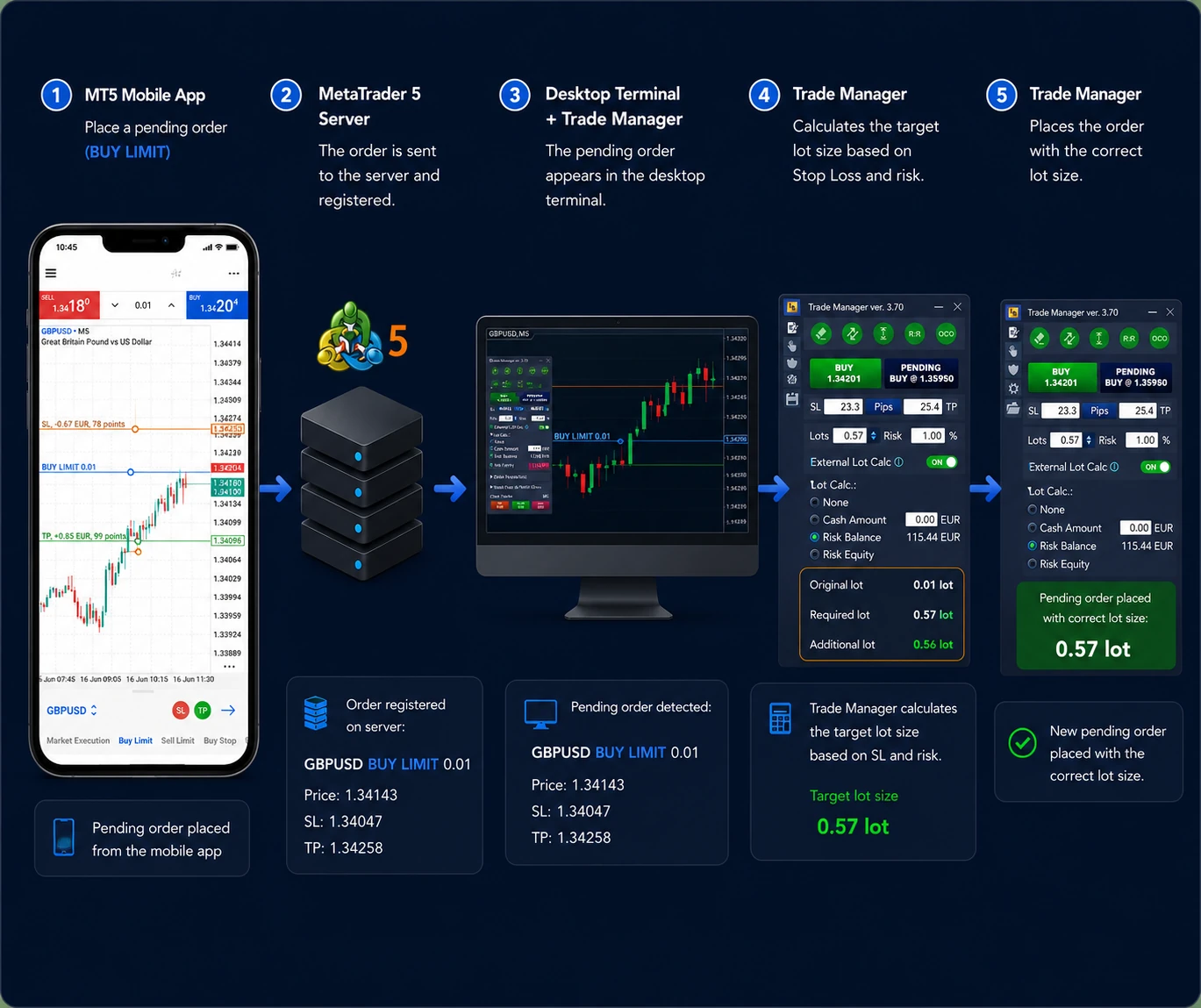
Automatic lot size calculation for trades opened from your phone
The MetaTrader 5 mobile app cannot run desktop trading add-ons directly. Trade Manager solves this by running in MT5 on your computer or VPS while you place the order from the mobile app connected to the same trading account.
Mobile market orders
Open a market position from MT5 Mobile. Trade Manager detects it, calculates the required total volume and opens the missing volume needed to match your predefined risk.
Mobile pending orders
For a new pending order, Trade Manager can replace the original order with a correctly calculated lot size while preserving the planned Entry, Stop Loss and Take Profit.
- Risk Balance, Risk Equity or fixed Cash Amount
- Automatic Stop Loss and Take Profit settings
- Desktop MT5 or VPS must remain active
Full mobile guide coming soon. The short video shows the workflow in under one minute.
On-chart calculator vs online calculator
Keep position sizing inside your MT5 trading workflow
Online calculators can perform the same underlying risk calculation, but an integrated MT5 position size calculator removes repeated data entry and keeps the result next to the order controls.
Typical online calculatorLot Size Calculator MT5
Enter symbol and account values manuallyReads live account and broker symbol data
Type the Stop Loss distance into a separate pageUses Entry and Stop Loss lines directly on the chart
Copy the result back into MetaTrader 5Shows the calculated lot in the Trade Manager panel
Recalculate after every changeUpdates automatically when risk or Stop Loss changes
Forex and CFD position sizing
Lot size calculation for different MT5 markets
Contract size, tick value, volume step and currency conversion can differ between instruments and brokers. Trade Manager uses the specification of the symbol currently displayed in MetaTrader 5.
Forex lot size calculator MT5
Calculate position size for major, minor and exotic currency pairs using the broker’s live tick value and account currency conversion.
Gold and XAUUSD lot calculation
Size gold trades from the actual Stop Loss distance without assuming that metal contracts behave like standard Forex pairs.
Indices such as NAS100 and US30
Use broker-specific contract and tick specifications for index CFDs, including symbols with custom names and volume steps.
Commodities and metals
Calculate risk-based volume for instruments whose point value and contract size differ from currency pairs.
Cryptocurrency CFDs
Apply the same risk-based position sizing process to supported crypto symbols available in your MT5 terminal.
Broker-specific symbols
Work with suffixes, prefixes and custom symbol specifications because the calculation reads data from the active chart.
More than a position size calculator
Continue managing the trade after the lot size is calculated
Lot size calculation is only the first step. The same Trade Manager panel can place the order and automate the actions that follow without switching to another tool.
Break Even
Move Stop Loss automatically to the entry price after the trade reaches a defined profit or risk-to-reward level.
Partial Close
Close selected percentages of the position automatically at predefined Take Profit levels.
Trailing Stop
Protect developing profit with classic, multi-level, indicator-based or price-structure trailing methods.
Equity Protection
Control account-level profit or loss and close selected trades or all positions when an equity condition is reached.
Quick Order Closing
Close one trade, a selected group or all positions with one click. Filter by profitable, losing, Buy-only or Sell-only trades.
MetaTrader 4 & MetaTrader 5
Available for MetaTrader 4 and MetaTrader 5. The same application version can run on Windows, macOS and Linux.
MQL5 Market reviews
Used by traders who value consistent risk
“It seamlessly takes the pain of risk management out of your trading and allows for quick trade executions.”
“The tool automatically handles the position sizing based on my defined risk. This removes guesswork.”
“It automatically adjusts position size, significantly reduces errors, and the customer service is amazing.”
Get the complete tool
Get the MT5 lot size calculator inside Trade Manager
Full MT5 version with updates and support.
Rent for 3 monthsOne-time payment with lifetime updates and support.
Buy lifetime licenseTest the calculator in your own MT5 terminal.
The calculator is included in the complete Trade Manager MT5 application, combining position sizing, visual trade planning and automated trade management in one tool.
MT5 lot size and position sizing FAQ
Lot Size Calculator MT5 questions
It is a position sizing tool that calculates trade volume from your selected risk method and Stop Loss distance. Trade Manager reads the required broker symbol specification automatically from MetaTrader 5.
Trade Manager combines account risk, the distance between Entry and Stop Loss, tick value, contract size, account currency conversion and the permitted volume step to calculate the appropriate lot size.
Yes. Select Risk Balance or Risk Equity, define the percentage and position the Stop Loss line. The calculated volume updates when either value changes.
Yes. Open the order from MT5 Mobile while Trade Manager runs in desktop MT5 or on a VPS connected to the same account. The program can process new external market and pending orders according to your settings.
Trade Manager calculates the required target volume and can open the missing volume as an additional market order so the combined position matches the predefined risk.
Trade Manager can remove the new pending order and recreate it with the correctly calculated lot size while preserving its planned order levels.
Yes. Trade Manager runs inside the desktop terminal, so MT5 must remain active. A VPS is useful when you want the automation to work while your own computer is turned off.
Yes. Risk Equity bases the calculation on current account equity, including floating profit and loss. Risk Balance and fixed Cash Amount are also available.
Yes. The calculator reads the broker’s symbol specification, including tick value, contract size and volume step, for Forex, metals, indices, commodities, crypto CFDs and custom symbols available in MT5.
No. It runs directly inside desktop MetaTrader 5 and uses live account, chart and broker symbol data.
Yes. When the Entry or Stop Loss distance changes, Trade Manager recalculates the volume using the selected risk method.
Yes. Select Cash Amount and enter the exact amount in your account currency that you are prepared to risk.
Consistent risk on every trade